Concepts
What is evaluation?
An evaluation (or “eval”) is a function that scores the behavior of an LLM on a specific aspect. The input of an evaluation function is the input and output of an LLM call, the output of the evaluation function is a score that quantifies the behavior of the LLM on the specific aspect.
Online vs Offline Evaluation (experiments)
There are two complementary ways to evaluate your application: offline and online evaluation. Both have their place in the development process.
Offline Evaluation (Experiments)
This means testing our application against a fixed dataset before deploying changes to production. Often, there are multiple iterations of fixing things based on the evaluation results, before deploying the changes to production.
Offline evaluations are also known as experiments.
Online Evaluations
Online evaluations are used to monitor what’s happening in production. This is done by evaluating production traces.
Real users will always find edge cases you didn’t anticipate. When you find edge cases through online evaluation, you can add them to your experiment datasets so that you can catch unexpected behavior during future offline evaluation runs.
The evaluation loop
In practice, successful evaluation blends online and offline evaluations. A common workflow looks like this:
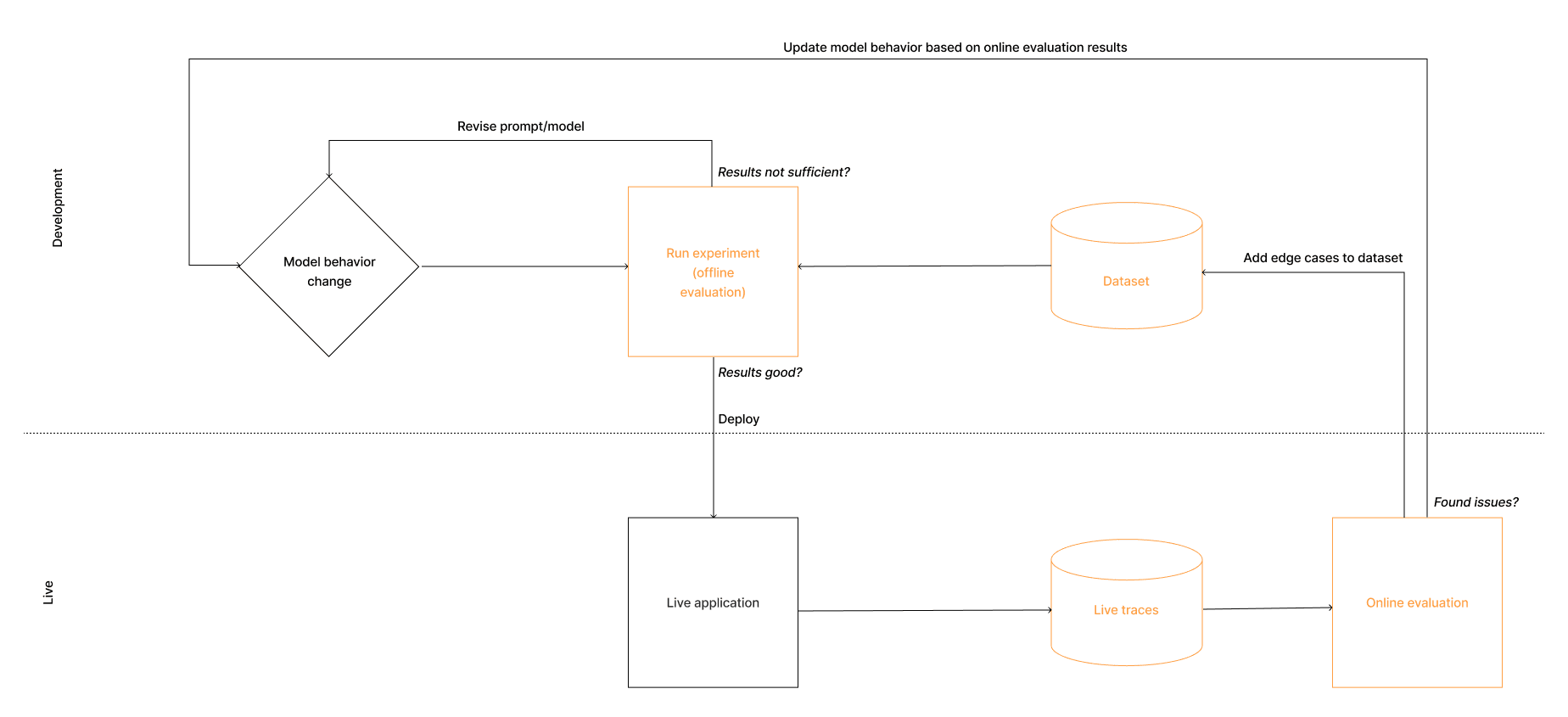
Here’s an example workflow for building a customer support chatbot
- You update your prompt to make responses less formal.
- Before deploying, you run an experiment: test the new prompt against your dataset of customer questions.
- You review the scores and outputs. The tone improved, but responses are longer and some miss important links.
- You refine the prompt and run the experiment again.
- The results look good now. You deploy the new prompt to production.
- You monitor with online evaluation to catch any new edge cases.
- You notice that a customer asked a question in French, but the bot responded in English.
- You add this French query to your dataset so future experiments will catch this issue.
- You update your prompt to support French responses and run another experiment.
Over time, your dataset grows from a couple of examples to a diverse, representative set of real-world test cases.
Evaluation Methods
For both offline and online evaluation, you can use a variety of evaluation methods.
| Method | What | Use when |
|---|---|---|
| LLM-as-a-Judge | Use an LLM to evaluate outputs based on custom criteria | Subjective assessments at scale (tone, accuracy, helpfulness) |
| Deterministic Checks | Rule-based validation of output properties | Format validation, length constraints, keyword matching |
| Human Annotation | Manual review and scoring in a UI | Building ground truth, edge cases, quality spot checks |
Experiments (offline evaluation)
An experiment runs your application against a dataset and evaluates the outputs. This is how you test changes before deploying to production.
Definitions
Before diving into experiments, it’s helpful to understand the building blocks in Langfuse: datasets, dataset items, scores, tasks, evaluators, and experiments.
| Object | Definition |
|---|---|
| Dataset | A collection of test cases (dataset items). You can run experiments on a dataset. |
| Dataset item | One item in a dataset.Each dataset item contains an input (the scenario to test) and optionally an expected output. |
| Task | The application code that you want to test in an experiment. This will be performed on each dataset item, and you will score the output. |
| Evaluator | A function that scores experiment results. In the context of a Langfuse experiment, this can be a deterministic check, or LLM-as-a-Judge. |
| Score | The result of an evaluator. This can be numeric, categorical, or boolean. See Scores for more details. |
| Experiment Run | A single execution of your task against all items in a dataset, producing outputs (and scores). |
You can find the data model for these objects here.
How these work together
This is what happens conceptually:
When you run an experiment on a given dataset, each of the dataset items will be passed to the task function you defined. The task function is generally an LLM call that happens in your application, that you want to test. The task function produces an output for each dataset item. This process is called an experiment run. The resulting collection of outputs linked to the dataset items are the experiment results.
Often, you want to score these experiment results using different evaluators. These evaluators take in the dataset item and the output produced by the task function, and produce a score based on a specific criteria you define. Based on these scores, you can then get a complete picture of how your application performs across all test cases.
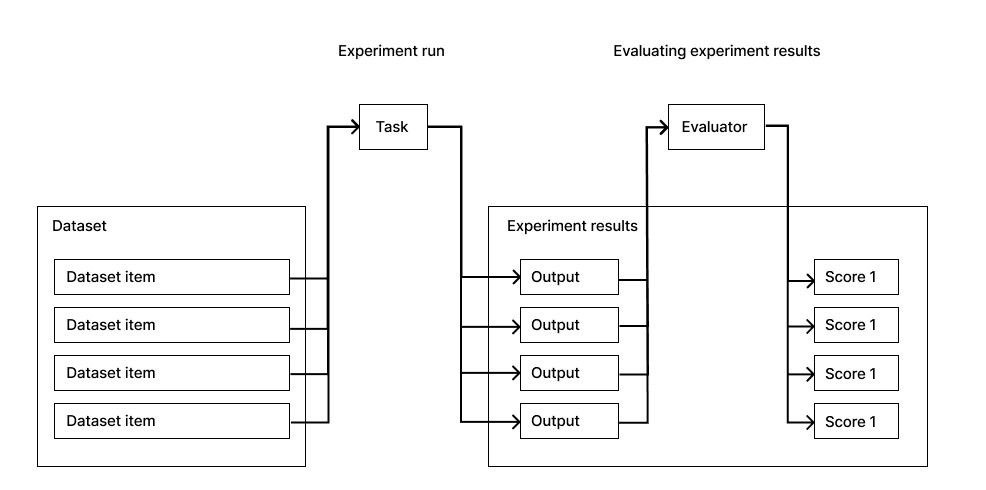
You can compare experiment runs to see if a new prompt version improves scores, or identify specific inputs where your application struggles. Based on these experiment results, you can decide whether the change is ready to be deployed to production.
You can find more details on how these objects link together under the hood on the data model page.
How to run an experiment
Langfuse supports two ways to run experiments, and you can use both in parallel for different workflows.
Via SDK
You can run experiments programmatically using the Langfuse SDK. This gives you full control over what the task, evaluator, etc. look like. Learn more about running experiments via SDK.
Via UI
Run experiments directly from the Langfuse interface by selecting a dataset and prompt version. This is useful for quick iterations on prompts without writing code. Learn more about running experiments via UI.
Online Evaluation
For online evaluation, evaluators are triggered to produce a score on production traces. This helps you catch issues immediately.
Langfuse currently supports LLM-as-a-Judge and human annotation checks for online evaluation. Deterministic checks are on the roadmap.
Monitoring with dashboards
Langfuse offers dashboards to monitor your application performance in real-time. You can also monitor scores in dashboards. You can find more details on how to use dashboards here.